目录
Chat Completion和Response API的区别
Intro
在使用第三方的OpenAI API key的时候,我经常会遇到这样的问题,明明一个key在某平台能用得了,在另一个平台或者Agent工具上(如codex)就用不了了,于是查看了OpenAI Developer的文档,了解了OpenAI API的Primitive migration,顺便进一步了解一下,原文如下Migrate to the Responses API
Migrate to the Responese API
Response API是OpenAI新的API原语,是Chat Completion的升级版(PS:有些平台仍然支持Chat Completion,有些平台已经全面迁移到Response了,这也是我们报错的主要原因)
Main differences between Chat and Completion
Response API相比Chat Completions的优势主要体现在下面,此处摘抄原文:
- Better performance: Using reasoning models, like GPT-5, with Responses will result in better model intelligence when compared to Chat Completions. Our internal evals reveal a 3% improvement in SWE-bench with same prompt and setup. (竟然还有Performance的提升,我猜测应该是对于function calling的规范化和消息处理导致的?)
- Agentic by default: The Responses API is an agentic loop, allowing the model to call multiple tools, like
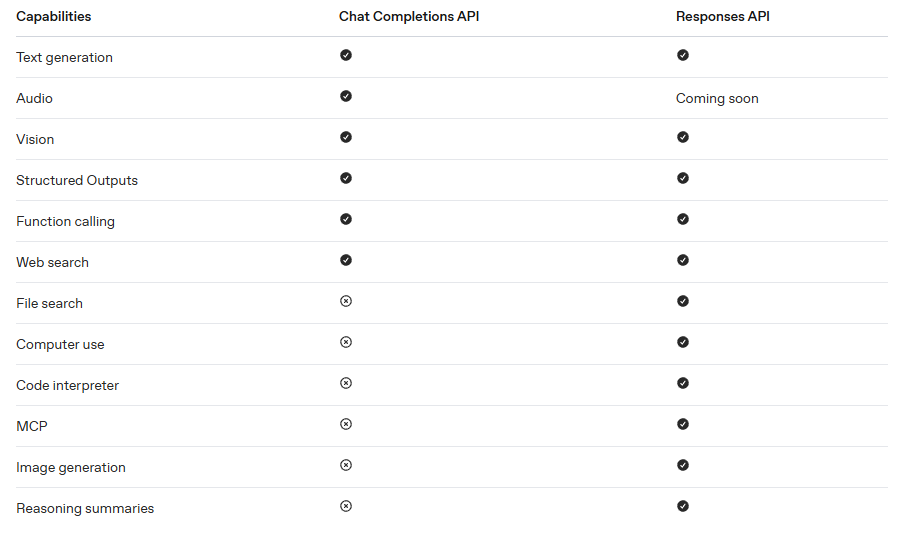
web_search,image_generation,file_search,code_interpreter, remote MCP servers, as well as your own custom functions, within the span of one API request. - Lower costs: Results in lower costs due to improved cache utilization (40% to 80% improvement when compared to Chat Completions in internal tests).
- Stateful context: Use
store: trueto maintain state from turn to turn, preserving reasoning and tool context from turn-to-turn. - Flexible inputs: Pass a string with input or a list of messages; use instructions for system-level guidance.
- Encrypted reasoning: Opt-out of statefulness while still benefiting from advanced reasoning.
- Future-proof: Future-proofed for upcoming models.
主要的区别在于Agentic能力,为了适应Agent的发展,现有的API需要进行扩展,以支持Web Search、File Search等工具的调用
Message vs. Items
Chat completion调用的过程主要是传递message的数组,而Response传递的是item,message也是item的一种,它还包括像fuction_call和fuction_call_output等与agent相关内容
两者在代码中体现如下
#Chat completion
from openai import OpenAI
client = OpenAI()

completion = client.chat.completions.create(
model="gpt-5",
messages=[
{
"role": "user",
"content": "Write a one-sentence bedtime story about a unicorn."
}
]
)

print(completion.choices[0].message.content)
#Responese
from openai import OpenAI
client = OpenAI()

response = client.responses.create(
model="gpt-5",
input="Write a one-sentence bedtime story about a unicorn."
)

print(response.output_text)
从中我们还可以看出一个区别,Chat completion可以返回多个并行的choices,在Response中,则移除了这个参数
当我们从Response API收到回复的时候,收到的不是message,而是一种带有ID的typed response对象
在Chat Completion中,我们会收到choices数组,每个选项都包含一个message,在Response中,我们会收到一个标记为ouput的items数组
#Chat completion
{
  "id": "chatcmpl-C9EDpkjH60VPPIB86j2zIhiR8kWiC",
  "object": "chat.completion",
  "created": 1756315657,
  "model": "gpt-5-2025-08-07",
  "choices": [
    {
      "index": 0,
      "message": {
        "role": "assistant",
        "content": "Under a blanket of starlight, a sleepy unicorn tiptoed through moonlit meadows, gathering dreams like dew to tuck beneath its silver mane until morning.",
        "refusal": null,
        "annotations": []
      },
      "finish_reason": "stop"
    }
  ],
  ...
}
#Response
{
  "id": "resp_68af4030592c81938ec0a5fbab4a3e9f05438e46b5f69a3b",
  "object": "response",
  "created_at": 1756315696,
  "model": "gpt-5-2025-08-07",
  "output": [
    {
      "id": "rs_68af4030baa48193b0b43b4c2a176a1a05438e46b5f69a3b",
      "type": "reasoning",
      "content": [],
      "summary": []
    },
    {
      "id": "msg_68af40337e58819392e935fb404414d005438e46b5f69a3b",
      "type": "message",
      "status": "completed",
      "content": [
        {
          "type": "output_text",
          "annotations": [],
          "logprobs": [],
          "text": "Under a quilt of moonlight, a drowsy unicorn wandered through quiet meadows, brushing blossoms with her glowing horn so they sighed soft lullabies that carried every dreamer gently to sleep."
        }
      ],
      "role": "assistant"
    }
  ],
  ...
}
Migrating from Chat completions
Update generation endpoints
这是导致我们请求失败的主要原因,就是请求的端点发生了变化,从/v1/chat/compltion,更新成了/v1/responses,现在的很多工具也会直接让我们提供到v1截止的base_url,以兼容不同的请求端点
Update item definitions
from openai import OpenAI
client = OpenAI()

completion = client.chat.completions.create(
    model="gpt-5",
    messages=[
        {"role": "system", "content": "You are a helpful assistant."},
        {"role": "user", "content": "Hello!"}
    ]
)
print(completion.choices[0].message.content)
from openai import OpenAI
client = OpenAI()

response = client.responses.create(
    model="gpt-5",
    instructions="You are a helpful assistant.",
    input="Hello!"
)
print(response.output_text)
在Chat completion中,你需要创建一个标识了消息身份和内容数组来传递信息,而Response则直接在顶层分开指令和输入,语义更加简洁
Update multi-turn conversations
messages = [
    {"role": "system", "content": "You are a helpful assistant."},
    {"role": "user", "content": "What is the capital of France?"}
]
res1 = client.chat.completions.create(model="gpt-5", messages=messages)

messages += [res1.choices[0].message]
messages += [{"role": "user", "content": "And its population?"}]

res2 = client.chat.completions.create(model="gpt-5", messages=messages)
context = [
    { "role": "role", "content": "What is the capital of France?" }
]
res1 = client.responses.create(
    model="gpt-5",
    input=context,
)

// Append the first response’s output to context
context += res1.output

// Add the next user message
context += [
    { "role": "role", "content": "And it's population?" }
]

res2 = client.responses.create(
    model="gpt-5",
    input=context,
)
在Chat中,你必须自己管理和存储上下文,这点Response也与其类似。但是为了简化,Response构建了一种新的方法,可以传递响应的ID来简单引用之前响应的输入输出,可以使用``previous_response_id`形成响应链,或者用于创建分支
res1 = client.responses.create(
    model="gpt-5",
    input="What is the capital of France?",
    store=True
)

res2 = client.responses.create(
    model="gpt-5",
    input="And its population?",
    previous_response_id=res1.id,
    store=True
)
Update function definitions
fuction definition是给模型看的接口文档,让模型知道能够调用什么工具,而两版API在definition上也有区别
{
      "type": "function",
      "function": {
        "name": "get_weather",
        "description": "Determine weather in my location",
        "strict": true,
        "parameters": {
          "type": "object",
          "properties": {
            "location": {
              "type": "string",
            },
          },
          "additionalProperties": false,
          "required": [
            "location",
            "unit"
          ]
        }
      }
  }
  {
      "type": "function",
      "name": "get_weather",
      "description": "Determine weather in my location",
      "parameters": {
        "type": "object",
        "properties": {
          "location": {
            "type": "string",
          },
        },
        "additionalProperties": false,
        "required": [
          "location",
          "unit"
        ]
      }
  }
两者对于函数定义的写法和默认约束不同,Chat采用的是外包一层fuction的写法,在"function"字段里面进行定义,而Response直接把name、description、parameter直接放在顶层。在调用上会体现为下面的区别
#Chat
tool.function.name
tool.function.parameters
#Response
tool.name
tool.parameters
还有一个区别就是Response的函数默认是strict,会更严格按照JSON Schema生成参数,具体细节可以查看Developers DocStrict mode
Update Structured Outputs definition
在格式化回复上,两个的不同体现在约束的位置,约束的内容基本一致
from openai import OpenAI
client = OpenAI()

response = client.chat.completions.create(
  model="gpt-5",
  messages=[
    {
      "role": "user",
      "content": "Jane, 54 years old",
    }
  ],
  response_format={
    "type": "json_schema",
    "json_schema": {
      "name": "person",
      "strict": True,
      "schema": {
        "type": "object",
        "properties": {
          "name": {
            "type": "string",
            "minLength": 1
          },
          "age": {
            "type": "number",
            "minimum": 0,
            "maximum": 130
          }
        },
        "required": [
          "name",
          "age"
        ],
        "additionalProperties": False
      }
    }
  },
  verbosity="medium",
  reasoning_effort="medium"
)
response = client.responses.create(
  model="gpt-5",
  input="Jane, 54 years old",
  text={
    "format": {
      "type": "json_schema",
      "name": "person",
      "strict": True,
      "schema": {
        "type": "object",
        "properties": {
          "name": {
            "type": "string",
            "minLength": 1
          },
          "age": {
            "type": "number",
            "minimum": 0,
            "maximum": 130
          }
        },
        "required": [
          "name",
          "age"
        ],
        "additionalProperties": False
      }
    }
  }
)
为什么会有这个改动呢,是因为Chat只负责消息的处理,而Response是一种更加通用的响应容器,文本只是其中一种输出,所以我们需要把他的格式从原来的response_format迁移成text.format
Update to native tools
Chat无法使用OpenAI的原生工具,你需要自己编写,Response支持了这项功能
import requests

def web_search(query):
    r = requests.get(f"https://api.example.com/search?q={query}")
    return r.json().get("results", [])

completion = client.chat.completions.create(
    model="gpt-5",
    messages=[
        {"role": "system", "content": "You are a helpful assistant."},
        {"role": "user", "content": "Who is the current president of France?"}
    ],
    functions=[
        {
            "name": "web_search",
            "description": "Search the web for information",
            "parameters": {
                "type": "object",
                "properties": {"query": {"type": "string"}},
                "required": ["query"]
            }
        }
    ]
)
answer = client.responses.create(
    model="gpt-5",
    input="Who is the current president of France?",
    tools=[{"type": "web_search_preview"}]
)

print(answer.output_text)
Conclusion
总结来说,Response是顺应Agent迅猛发展的产物。Chat Completions API 更像传统“聊天接口”,你自己传 messages、自己管上下文、自己编排工具;Responses API 更像统一的“智能体接口”,除了能直接做文本生成,还把状态串联、工具调用和更丰富的输出结构统一进了一个接口里,所以更适合新项目和需要工具/agent能力的场景。 OpenAI 官方现在也明确把 Responses 作为主要接口来推荐,而 Chat Completions 仍然支持、但更偏向简单聊天生成场景。